Engineering in the Field
I run systems as a Head of Cloud and playful engineer in the trenches. Most people use AI coding assistants to write trivial five-line snippets. In complex cloud and distributed environments, snippets are low-leverage toys.
I treat Google Antigravity AI as an autonomous field engineer with direct sandboxed CLI, shell execution, test suites, and git authority. This page is my personal notebook of battle-tested, high-leverage prompts that automate end-to-end engineering tasks without human babysitting.
Have a prompt that saved you dozens of hours or solved a nasty distributed edge case? Bookmark this page and check back as I push more production directives straight from my daily deployments.
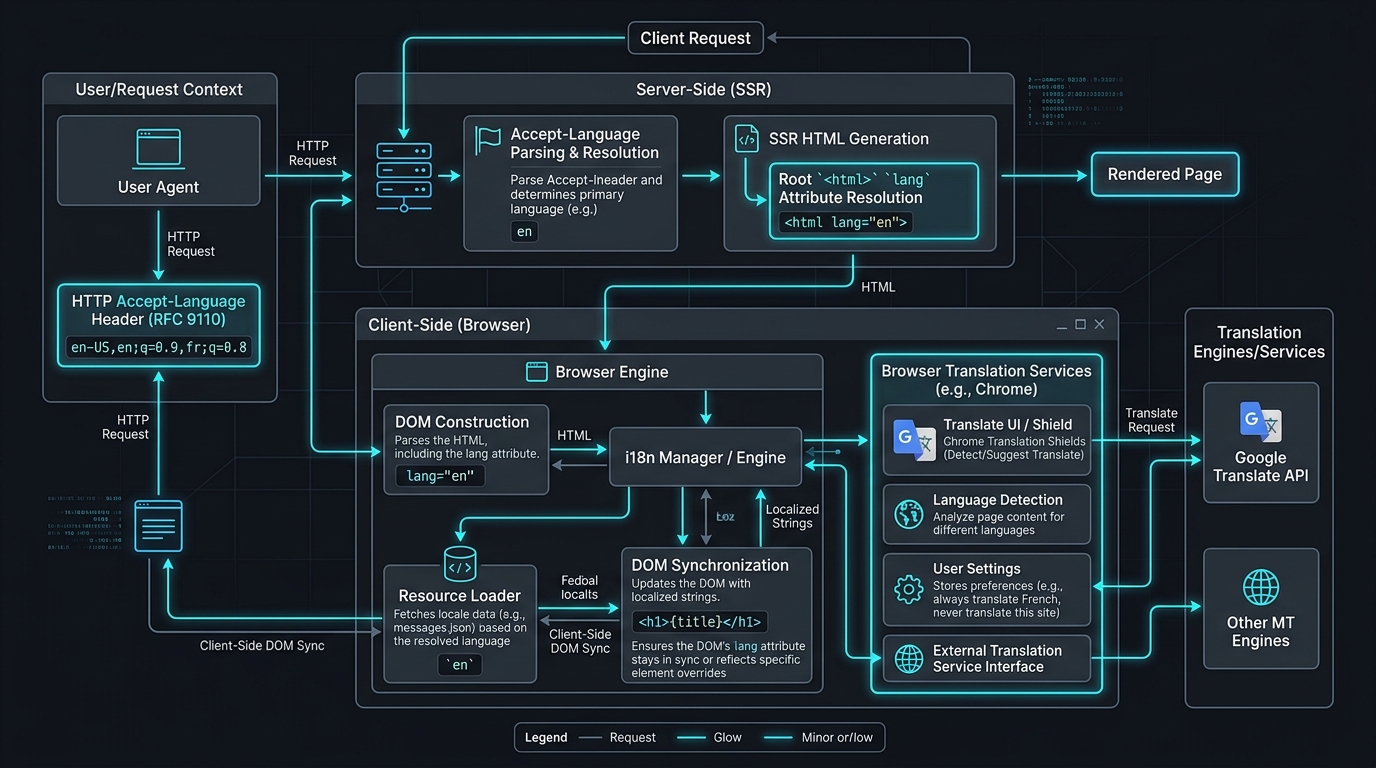
⚠️ Tech Ahead: The sections below dive into RFC 9110 language quality weighting (
q=...), SSR<html lang>synchronization, Chrome Translate DOM race conditions, and self-healing CI/CD prompt specifications.
1. Full-Stack i18n & Browser Translation Audit + Release Pipeline
The Architecture & Root Cause
In production multilingual deployments—such as mondar.ch—browser translation engines (like Google Chrome Translate) break when client state and DOM headers de-synchronize.
Critical Failure Modes
- Hardcoded SSR Root
<html lang>: Server-side layout hardcodes<html lang="de">. Chrome inspects raw markup before client hydration and permanently locks the detected page language. - Client DOM De-sync: Language switchers update React state but fail to synchronize
document.documentElement.lang,<meta http-equiv="content-language">, anddocument.title. - Naive Substring Matching vs. RFC 9110: Using
header.includes("en")breaks multilingual requests (e.g.de-CH,de;q=0.9,en;q=0.8). The server forces English despite German having higher priority (q=0.9). - Mangled Switcher Badges: Missing
translate="no"andclassName="notranslate"causes Chrome to translate ISO language codes (DEtranslated to preposition "of/from").
The Master Prompt
Perform an internationalization (i18n) and browser translation audit on this project, fix any detected bugs, and run the complete release pipeline:

1. **i18n & Browser Translation Audit**:
   - **Root `<html lang>`**: Ensure `<html lang="...">` is NEVER hardcoded. It must dynamically match the active locale on server-side rendering (reading cookies, URL parameters, and `Accept-Language` headers).
   - **RFC-Compliant Header Parsing**: Verify `Accept-Language` header parsing does NOT use naive substring matching (e.g. `header.includes('en')`). It must parse RFC 9110 quality weights (`q=...`) and primary language subtags so users with fallback languages aren't incorrectly mapped to the wrong language.
   - **Client-Side DOM Sync**: Whenever the user switches language in the UI, reactively synchronize:
     - `document.documentElement.lang`
     - `<meta http-equiv="content-language" content="...">`
     - `document.title`
     This prevents Chrome / Google Translate from misdetecting the source language and offering incorrect translation popups.
   - **Switcher Protection**: Ensure language switcher badges (`DE`, `EN`, `PT`, `FR`, etc.) have `translate="no"` and `className="notranslate"` to prevent auto-translation tools from translating language codes.
   - **SEO Alternates**: Ensure `metadata.alternates.languages` (hreflang links) are configured for all supported locales.

2. **Code Assessment & Testing**:
   - Check for regressions, edge cases, and type safety.
   - Run unit tests and linting (`npm test`, `npm run lint`, `npm run build`).

3. **Delivery & Deployment Pipeline**:
   - Create a dedicated fix branch (`fix/i18n-lang-sync`).
   - PR to `develop`, wait for CI checks to pass, and merge.
   - Bump release version in `package.json`, PR from `develop` to `master`, wait for CI checks to pass, and merge.
   - Tag the release version (e.g. `vX.Y.Z`).
   - Monitor the CI/CD production deployment until complete and verify live HTTP response headers and `<html lang="...">`.
2. Dedicated Deep-Dive Pipeline Guides
For focused operational pipelines, I have extracted dedicated directives into standalone articles:
- Two-Stage Git PR, Cybersecurity Audit & Release Pipeline: Automates feature branching, OWASP security static analysis, CI gating, and production semantic tagging.
- Autonomous Zero-Touch CLI Deployment & Health Verification: Abstracting infrastructure details behind standardized deployment runners, PM2/container supervision, and live HTTP health check validations.
3. Quick Targeted i18n Audit (No Git Overhead)
For localized debugging or small repositories where git release cycles are handled out-of-band:
Inspect the i18n setup to make sure the page language is correctly declared to browsers:

1. Check that the root `<html lang>` attribute dynamically reflects the active locale during SSR (via cookie, query param, or RFC 9110 `Accept-Language` header parsing with `q` weights).
2. Ensure client-side language switching dynamically updates `document.documentElement.lang`, `meta[http-equiv="content-language"]`, and `document.title`.
3. Add `translate="no"` and `className="notranslate"` to language switchers so Google Translate doesn't mangle language codes.
4. Run tests and verify with a curl test that different `Accept-Language` headers and cookies return the matching `<html lang="...">`.
The Engineering Formula: 4 Pillars of Agentic Directives
| Pillar | Technical Rationale | Operational Rule |
|---|---|---|
| 1. Technical Specificity | Prevents heuristic guessing by the LLM. | Name RFC standards, DOM attributes, and exact HTTP headers. |
| 2. Self-Healing Gates | Ensures verified functionality before turn completion. | Enforce npm test, npm run lint, and build exits. |
| 3. Operational Scope | Maintains repository discipline automatically. | Route changes strictly through branch -> develop -> CI -> master -> tag. |
| 4. Invariant Protection | Prevents unintended collateral damage. | State explicitly what must remain untouched or protected. |